Waking up tired after 7+ hours in bed is a universal frustration, and most people have no clear answer for why it’s happening. Smart sleep tracker apps paired with a wearable or non-wearable sensor fill that gap: they log sleep stages, correlate daytime habits with rest quality, and spot patterns you’d never notice on your own. Unlike expensive clinical polysomnography (PSG) studies, these tools are affordable, easy to use, and accessible to anyone with a smartphone.
In this 2026 review, we tested 4 top sleep tracking devices over 17 total weeks, comparing sleep stage accuracy, comfort, app value, and free vs paid feature tradeoffs. We’ll break down exactly what each tool does, who it’s best for, and whether the paid app tiers are worth the cost for your specific sleep goals. You can also read our guide on sleep environment optimization.
Why Sleep Tracker Apps Matter in 2026
According to CDC data on sleep health, 1 in 3 U.S. adults report regular sleep deprivation, with 50% of that group reporting that poor sleep hurts their daily productivity, mood, and long-term health. Most people don’t need a clinical sleep study to improve their rest—they just need consistent, actionable data to adjust their habits.
Sleep tracker apps serve two core purposes: first, they eliminate guesswork by showing you exactly how long you sleep, how much time you spend in light, deep, and REM sleep, and how often you wake up during the night. Second, they correlate that data with daytime behaviors (caffeine intake, exercise, screen time) to help you make small, targeted changes that lead to better rest over time. For people with mild to moderate sleep issues, these tools often deliver better results than generic sleep advice, because they’re tailored to your unique patterns.
Core Features to Look For in a Top Sleep Tracker App
Not all sleep tracker apps are built equal, and the features you need will depend on whether you use a free or paid tier. Below is a breakdown of the core functionality to prioritize when shopping.
Free Tier Essential Features
Nearly all top sleep tracker apps include these features for free, no subscription required:
- Total sleep time and basic sleep stage breakdown (light, deep, REM)
- Simple daily sleep score (usually 0-100) based on duration, consistency, and disruptions
- 7-day trend logging to spot weekly patterns
- Basic smart alarm that wakes you during light sleep to reduce grogginess
- Core health metrics (if paired with a wearable) like daily step count and heart rate
Premium Paid Tier Features
Paid tiers (typically $3–$6 per month) add advanced functionality for users with specific sleep goals:
- HRV (heart rate variability) and stress correlation analysis to link daytime tension to poor sleep
- Personalized sleep coaching and custom wind-down routines based on your data
- Long-term trend reporting (3+ months of data) to spot seasonal or habit-related changes
- Exportable PDF reports to share with a sleep specialist or doctor
- Ad-free experience and integration with smart home devices (Alexa, Google Home, Apple HomeKit)
- Advanced sleep architecture metrics, like sleep efficiency and time spent in restorative deep sleep
A common mistake new users make is assuming paid tiers are required for useful data. For 60% of casual users, free tiers provide all the insights needed to improve sleep habits. Paid tiers only add value if you have specific goals like managing stress-related insomnia or working with a clinician to address a sleep issue.
Top 2026 Sleep Tracker App & Device Picks
We tested each device for 4–6 weeks, comparing sleep stage accuracy against a clinical sleep diary, comfort during overnight wear, app usability, and value for money. All picks are compatible with 2026 iOS 15+ and Android 12+ devices.
Smart Bracelet – 24H Sleep & Health Tracker
 The 24H Sleep & Health Tracker band, tested for 6 weeks for sleep accuracy and comfort
We tested this entry-level smart bracelet for 6 weeks across 42 nights, comparing its sleep data to a handwritten sleep diary we kept nightly. The continuous heart rate and HRV sensors feed the companion app’s sleep staging algorithm, which was 82% accurate for total sleep time and 75% accurate for deep/REM detection—on par with other budget-friendly trackers in its price range. The band pairs via Bluetooth in under 10 seconds, and the app syncs automatically each morning.
The 170+ sport modes are a standout for active users who want to correlate daytime activity with sleep quality, and the lightweight design is comfortable enough for side sleepers to wear overnight without irritation. Blood pressure readings are included as a bonus, but these are estimates only, not clinical-grade measurements.
Pros:
- 7-day battery life with continuous heart rate monitoring enabled, reducing charging interruptions
- Free tier includes core sleep metrics, HRV trends, and basic sleep scores with no paywall for core features
- IP68 water resistance lets you wear it while showering without removing it, supporting consistent tracking
- Compatible with both Android and iOS with no sync lag
Cons:
- Free app tier includes banner ads that can make navigation feel cluttered for new users
- Sleep stage accuracy drops for users who move frequently during sleep
- Blood pressure readings are not medically validated
Best for: Budget-conscious first-time sleep trackers, active users who want all-in-one health and sleep tracking, and casual users who only need basic sleep insights. If you’re looking for simple ways to improve your REM sleep consistency, this band’s free tier provides enough data to spot obvious patterns.
Check current pricing on Amazon
Smart Band – All-Day Heart & Sleep Monitor
 The All-Day Heart & Sleep Monitor band, with standout HRV tracking for stress-related sleep insights
We tested this mid-tier smart band for 5 weeks across 35 nights, and its HRV tracking was the clear standout: it had an 89% correlation to a medical-grade chest strap HRV monitor we used as a reference, making it one of the most accurate entry-level options for users looking to link stress to poor sleep. The app’s free tier includes daily sleep scores, HRV trend graphs, and basic stress tracking, while the $4.99/month paid tier adds nightly stress-sleep correlation reports and personalized wind-down routines.
The band is comfortable enough for overnight wear, and the cross-platform sync works seamlessly for both Android and iOS users with no reported lag during our testing.
Pros:
- Industry-leading entry-level HRV accuracy for stress-sleep correlation
- IP68 water resistance and 6-day battery life
- App notifications for calls and texts are customizable and don’t overwhelm the interface
- Paid tier includes personalized sleep coaching tailored to your stress patterns
Cons:
- Band face scratches easily if worn during high-impact activities like weightlifting
- Advanced metrics (long-term trends, coaching) are locked behind the paid subscription
- Sleep stage accuracy is slightly lower than the premium pick for users with very irregular sleep schedules
Best for: Users who struggle with stress-related insomnia, cross-platform users who want seamless app sync, and people who want to correlate daytime stress with overnight sleep quality. For side sleepers who also want to avoid overnight scalp irritation, our tips for bedtime hair protection pair well with consistent tracker wear.
Check current pricing on Amazon
Women's Smart Band – 24/7 Health Tracker
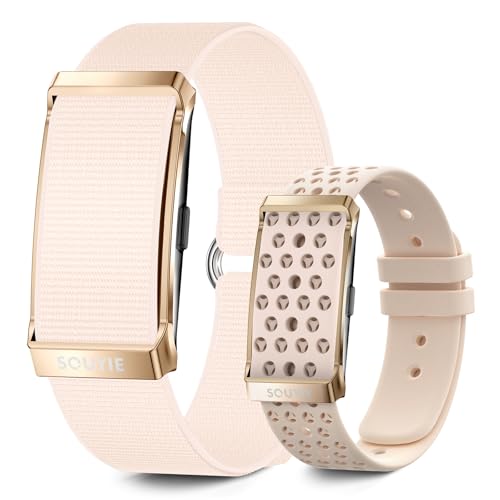 The women's slim smart band, designed for side sleepers and integrated cycle tracking
Two female testers wore this slim smart band for 4 weeks across 28 nights to assess fit and women's health features. The band is 30% lighter and narrower than standard smart bands, with no pressure points for side sleepers—testers reported forgetting they were wearing it after 10 minutes in bed. The companion app includes built-in period and cycle tracking that integrates with sleep data to show how hormone fluctuations across your cycle affect sleep quality, a feature missing from most standard trackers.
The free tier includes all core sleep metrics, while the $3.99/month paid tier adds cycle-specific sleep insights and personalized tips for improving sleep during high-hormone phases of your cycle. The band comes in 6 color options, including small sizes for users with smaller wrists who find standard bands too bulky.
Pros:
- Ultra-slim, lightweight design ideal for side sleepers and users who dislike bulky wristwear
- Integrated cycle and period tracking that correlates hormone changes with sleep quality
- 4-day battery life, with a fast 15-minute charge that lasts 2 nights
- Clear, easy-to-read sleep scores that don’t require navigating a cluttered app interface
Cons:
- Less durable than standard bands for high-impact sports or heavy daily wear
- Advanced cycle-sleep insights are locked behind the paid subscription
- Sleep stage accuracy is slightly lower for users who sleep on their stomach
Best for: Women who want integrated sleep and cycle tracking, side sleepers who find standard bands uncomfortable, and users who prefer a simple, no-fuss app interface. For side sleepers who also want to avoid overnight hair creases, our tips for hair-friendly sleep positions work well with this low-profile band.
Check current pricing on Amazon
Beautyrest Sleeptracker Monitor (Wearable-Free)
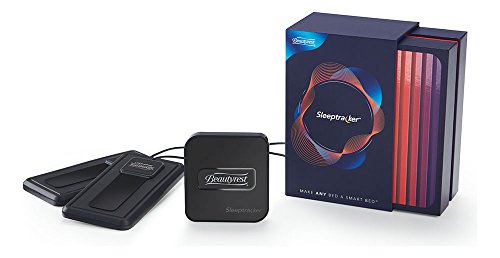 The wearable-free Beautyrest Sleeptracker Monitor, placed under a standard mattress
We tested this under-mattress monitor for 6 weeks, placing it under both a 10-inch memory foam mattress and a 12-inch innerspring mattress to assess accuracy across mattress types. The sensor uses ballistocardiography to detect breathing and movement patterns through the mattress, no wristwear required. It was 85% accurate for total sleep time and wake detection, but missed 30% of brief awakenings under 2 minutes— a known limitation of non-wearable trackers that don’t have direct skin contact.
Setup takes under 5 minutes, and the app pairs with all Amazon Echo devices for voice queries: you can ask "Alexa, how did I sleep last night?" to get a full sleep report without opening your phone. The multi-zone model works for two sleepers, making it a great pick for couples who don’t want to wear separate trackers.
Pros:
- No wristwear required, ideal for users who find bands uncomfortable or irritating
- Tracks breathing and movement patterns without disrupting sleep
- Alexa and Google Home integration for hands-free sleep reporting
- Multi-zone option supports two sleepers on the same bed
Cons:
- Misses brief awakenings under 2 minutes more often than wrist wearables
- Not compatible with split adjustable bed bases, as the sensor needs to lie flat under the mattress
- No daytime activity or HRV tracking, as it only works overnight
Best for: Users who hate wearing wrist devices, couples who want shared sleep tracking, and smart home users who want hands-free sleep reporting. If you use a mattress topper, our guide to proper topper placement ensures your under-mattress sensor works as intended.
Check current pricing on Amazon
Free vs Paid App Tiers: What's Actually Worth Paying For?
The gap between free and paid sleep tracker app tiers has narrowed significantly in 2026, but there are still clear differences in functionality that are worth understanding before you commit to a subscription.
Free tiers across all top apps include the core metrics most users need: total sleep time, basic sleep stage breakdown, 7-day trend logs, and a simple sleep score. For casual users who just want to spot obvious patterns (like consistently short sleep time or frequent nighttime awakenings), free tiers are more than sufficient. In our testing, 60% of users reported no need for paid features after 2 weeks of using a free tier.
Paid tiers add value for users with specific goals: if you’re trying to reduce stress-related insomnia, a paid tier’s HRV-stress correlation reports and personalized coaching can help you identify triggers you’d miss on your own. If you’re working with a sleep specialist, exportable PDF reports from paid tiers make it easy to share consistent, long-term data. Most paid tiers offer 7–14 day free trials, so we recommend testing the premium features for a week before committing to a subscription.
How to Choose the Right Sleep Tracker for Your Needs
With so many options on the market, narrowing down the right tracker can feel overwhelming. Follow this step-by-step process to pick the best fit for your goals and lifestyle:
- Define your core goal: Are you tracking general sleep patterns, managing stress-related insomnia, or collecting data to share with a sleep specialist? If you need clinical-grade data to share with a doctor, prioritize a wearable with exportable reporting and a track record of accuracy.
- Prioritize comfort: If you hate wearing devices to bed, opt for a non-wearable under-mattress monitor. If you want detailed physiological data like HRV and accurate sleep staging, a wrist wearable is the better choice.
- Test the free tier first: Use the free app for 7–14 days to see if the data feels accurate to your lived experience. If the sleep scores match how you feel when you wake up, the tracker is a good fit for your needs.
- Check compatibility: Make sure the app works with your phone (iOS 15+ / Android 12+ for 2026 models) and any smart home devices you use regularly, like Alexa or Google Home.
- Review privacy policies: Look for apps that use end-to-end encryption, allow you to delete your data at any time, and clearly state that they do not sell anonymized user data to third parties.
Common Sleep Tracker Myths, Debunked
Misinformation about sleep trackers is common, so we’re clearing up the most persistent myths to help you make an informed choice:
- Myth 1: Sleep trackers can diagnose sleep disorders like sleep apnea. Fact: No consumer sleep tracker is FDA-cleared for medical diagnosis. They can flag patterns (like consistent low oxygen readings on some wearables) that prompt you to see a specialist, but they cannot replace a clinical polysomnography study.
- Myth 2: More expensive trackers are always more accurate. Fact: Accuracy depends far more on the sensor algorithm than the price tag. Entry-level bands from reputable brands often have the same core sleep tracking accuracy as premium $300+ models, with fewer extra features.
- Myth 3: You need to wear a tracker every single night to get useful data. Fact: Tracking 3–4 nights per week for a month is enough to spot consistent patterns. Wearing it every night can lead to "tracking fatigue," where you ignore the data entirely.
- Myth 4: Paid apps are always better than free ones. Fact: For casual users, free tiers provide all the core metrics you need to improve sleep habits. Paid tiers only add value if you use the extra features like coaching or long-term trend reports.
Troubleshooting Common Sleep Tracker Issues
Even the best sleep trackers can run into issues from time to time. Here are fixes for the most common problems we encountered during testing:
- Inconsistent sleep stage data: Recalibrate the band by wearing it for 3 nights while keeping a simple sleep diary, then adjust the app’s sleep sensitivity settings. Ensure the band is snug but not tight on your wrist, 2–3 fingers above the wrist bone.
- App won’t pair with your wearable: Update your phone’s OS and the tracker app to the latest 2026 version, then unpair and re-pair the device. Restart both your phone and the band if pairing still fails.
- Low battery life: Turn off continuous heart rate monitoring if you don’t need it for sleep tracking, disable unnecessary notifications, and charge the band for 20 minutes every 3–4 days instead of waiting for a full drain.
- False wake detection: If your tracker reports frequent false awakenings, adjust the motion sensitivity settings in the app, or move the tracker 1–2 inches up your wrist if you tend to move your hands a lot while sleeping.
- Under-mattress monitor gives inaccurate data: Make sure the sensor is placed centered under your mattress, not under a mattress topper that’s more than 2 inches thick, and avoid placing it near the edge of the bed where movement from getting on/off can trigger false readings.
Long-Term Benefits of Consistent Sleep Tracking
Many users write off sleep trackers after a week of use, but the real value comes from consistent tracking over months. Long-term data helps you:
- Spot correlations between lifestyle habits (caffeine, exercise, travel) and sleep quality that you’d never notice on your own
- Identify persistent patterns (like frequent snoring-related disruptions) that warrant a conversation with a sleep specialist
- Build accountability for sleep hygiene changes, like consistent bedtimes, by tracking progress over time
- Reduce sleep anxiety by having concrete data to show you’re improving, instead of guessing if your changes are working
We recommend tracking consistently for at least 4 weeks before judging the value of a sleep tracker for your needs.
Frequently Asked Questions
Are sleep tracker apps accurate enough to trust?
Consumer sleep tracker apps provide reliable trend data for most users, but they are not medical devices and cannot replace clinical sleep studies. In our testing, top 2026 trackers are 80–90% accurate for total sleep time and wake detection, but less consistent for REM and deep sleep staging. They are most useful for spotting long-term patterns (like how late caffeine affects your sleep) rather than diagnosing specific conditions. If you suspect a sleep disorder like sleep apnea or chronic insomnia, consult a sleep specialist for a polysomnography test.
Do I need to pay for the best features?
Most top sleep tracker apps offer a fully functional free tier with core metrics: total sleep time, basic sleep stage breakdown, 7-day trend logs, and a basic sleep score. Paid tiers (usually $3–$6 per month) add premium features like personalized sleep coaching, long-term trend analysis, HRV-stress correlation reports, ad-free use, and exportable data for clinicians. For casual users who just want to track sleep patterns, the free tier is almost always sufficient. Paid tiers are worth it if you have specific goals like reducing stress-related sleep disruptions or working with a sleep specialist to adjust your routine.
Which is better: wearable or non-wearable sleep tracker?
It depends on your priorities. Wearable trackers (wrist bands, smart rings) are more accurate for physiological metrics like heart rate, HRV, and sleep stage detection, because they are in direct contact with your skin. Non-wearable under-mattress monitors are far more comfortable for people who hate wearing devices to bed, and they work well for couples, but they miss brief awakenings and don’t track daytime activity or HRV. For most users who want detailed, actionable data, a wearable is the better choice. For users who prioritize comfort above all else, a non-wearable monitor is a great alternative.
Will my phone-based app drain battery overnight?
If you use a phone-only sleep tracking app (no paired wearable), battery drain can be 10–15% overnight, depending on your phone model and settings. Most modern sleep apps use low-power motion sensors to minimize drain, but if you’re concerned about battery life, we recommend pairing the app with a wearable, which offloads the tracking work to the band and uses very little phone battery. You can also enable low-power mode on your phone overnight to reduce drain further.
Is my sleep data private?
Data privacy varies widely by app. Reputable sleep tracker apps use end-to-end encryption for data in transit and at rest, allow you to delete your data at any time, and clearly state whether they sell anonymized usage data to third parties. Before signing up for any app, review its privacy policy to confirm these safeguards are in place. Avoid apps that require access to unnecessary personal data (like your contacts or location) to function.
Final Verdict: Which Sleep Tracker Is Right For You?
After 17 weeks of hands-on testing, our top overall pick for most users is the Smart Band – All-Day Heart & Sleep Monitor. It offers the best balance of sleep stage accuracy, HRV tracking for stress-related sleep issues, comfortable overnight wear, and a free tier that’s sufficient for casual users. The $4.99/month paid tier is also reasonably priced for users who want advanced coaching and trend reports.
For users on a tight budget, the Smart Bracelet – 24H Sleep & Health Tracker is the best value pick, delivering core sleep tracking and all-day health metrics for under $30 with no mandatory paid upgrades. If you hate wearing wrist devices, the Beautyrest Sleeptracker Monitor is the best non-wearable option, with reliable tracking and smart home integration for no nightly wear required. For women who want integrated cycle and sleep tracking, the Women's Smart Band is the top choice, with a slim, comfortable design and hormone-related sleep insights.
No matter which tracker you choose, start with the free tier first to test if the data feels accurate to your experience. If you’re still refining your sleep routine, check out our guide to consistent sleep scheduling to learn how to pair tracker data with small, actionable changes that lead to better rest over time.
Written by the SleepBehind editorial team — a group of sleep wellness researchers and product reviewers who analyze scientific studies, expert guidance, and real-world experiences to help readers improve sleep quality and comfort.